For a JavaScript-based project I’m working on, I need to be able to sample from a variety of probability distributions. There are ways to call R from JavaScript, but they depend on the server running R. I can’t depend on that. I need a pure JS solution.
I found a handful of JS libraries that support sampling from distributions, but nothing that lets me use the R syntax I know and (mostly) love. Even more importantly, I would have to trust the quality of the sampling functions, or carefully read through each one and tweak as needed. So I decided to create my own JS library that:
Conforms to R function names and parameters – e.g. rnorm(50, 0, 1)
Uses the best entropy available to simulate randomness
Includes some non-standard distributions that I’ve been using (more on this below)
Not a JS developer? Just want to play with the library? I’ve setup a test page here.
Please keep in mind that this library is still in its infancy. I’d highly recommend you do your own testing on the output of any distribution you use. And of course let me know if you notice any issues.
In terms of additional distributions, these are marked “experimental” in the source code. They include the unreliable friend and its discrete cousin the FML, a frighteningly thick-tailed distribution I’ve been using to model processes that may never terminate.
“So let’s start with the fact that the study had only 100 people, which isn’t nearly enough to be able to make any determinations like this. That’s very small power. Secondly, it was already split into two groups, and the two groups by the way have absolutely zero scientific basis. There is no theory that says that if I want a girl or if I want a boy I’m going to be better able at determining whether my baby is in fact a girl or a boy.”
– Maria Konnikova, speaking on Mike Pesca’s podcast, The Gist.
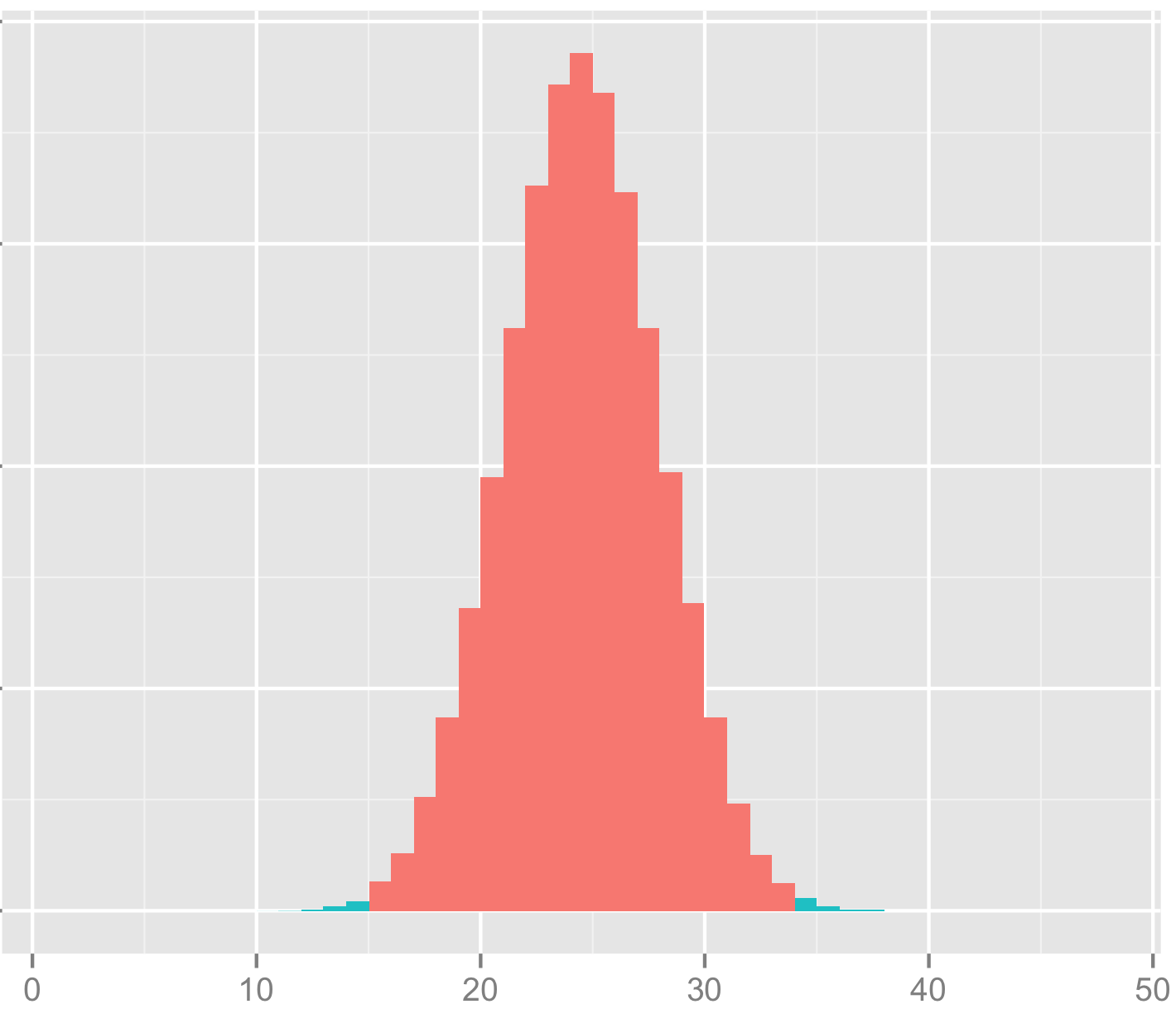
Shown at top, above the quote by Konnikova, is a simulation of the study in question, under the assumption that the results were completely random (the null hypothesis). As usual, you’ll find my code in R at the bottom. The actual group of interest had just 48 women. Of those, 34 correctly guessed the sex of their gestating babies. The probability that you’d get such an extreme result by chance alone is represented by the light green tails. To be conservative, I’m making this a two-tailed test, and considering the areas of interest to be either that the women were very right, or very wrong.
The “power” Konnikova is referring to is the “power of the test.” Detecting small effects requires a large sample, detecting larger effects can be done with a much smaller sample. In general, the larger your sample size, the more power you have. If you want to understand the relationship between power and effect size, I’d recommend this lovely video on the power of the test.
As it turns out, Konnikova’s claims notwithstanding, study authors Victor Shamas and Amanda Dawson had plenty of power to detect what turns out to be a very large effect. Adding together the two green areas in the tails, their study has a p-value of about 0.005. This a full order of magnitude beyond the generally used threshold for statistical significance. Their study found strong evidence that women can guess the sex of their babies-to-be.
Is this finding really as strong as it seems? Perhaps the authors made some mistake in how they setup the experiment, or in how they analyzed the results.
Since apparently Konnikova failed not only to do statistical analysis, but also basic journalism, I decided to clean up on that front as well. I emailed Dr. Victor Shamas to ask how the study was performed. Taking his description at face value, it appears that the particular split of women into categories was based into the study design; this wasn’t a case of “p-value hacking”, as Konnikova claimed later on in the podcast.
Konnikova misses the entire point of this spit, which she says has “absolutely zero scientific basis.” The lack of an existing scientific framework to assimilate the results of the study is meaningless, since the point of the study was to provide evidence (or not) that that our scientific understanding lags behind what woman seem to intuitively know.
More broadly, the existence of causal relationships does not depend in any way on our ability to understand or describe (model) them, or on whether we happen to have an existing scientific framework to fit them in. I used to see this kind of insistence on having a known mechanism as a dumb argument made by smart people, but I’m coming to see it in a much darker light. The more I learn about the history of science, the more clear it becomes that the primary impediment to the advancement of science isn’t the existence of rubes, it’s the supposedly smart, putatively scientific people who are unwilling to consider evidence that contradicts their worldview, their authority, or their self-image. We see this pattern over and over, perhaps most tragically in the unwillingness of doctors to wash their hands until germ theory was developed, despite evidence that hand washing led to a massive reduction in patient mortality when assisting with births or performing operations.
Despite the strength of Shamas and Dawson’s findings, I wouldn’t view their study as conclusive evidence of the ability to “intuit” the sex of your baby. Perhaps their findings were a fluke, perhaps some hidden factor corrupted the results (did the women get secret ultrasounds on the sly?). Like any reasonable scientist, Shamas wants to do another study to replicate the findings, and told me that has a specific follow-up in mind.
VIDEO TRANSCRIPT: Hello, this is Matt Asher from StatisticsBlog.com. I’m going to be reviewing Mathematica 9, from Wolfram Research. In particular, I’ll be focusing on using it with R and to do Monte Carlo simulations and other statistical work. You can find a full transcript of this video at my blog, including the source code and links to all of the webpages I mention.
Before I begin I’d like to thank Jeff Hara and Andy Ross from Wolfram for their time. Also thanks to the folks at the Mathematica Stack Exchange, who helped with a couple of my questions.
I’m going to get started with a blank notebook. I’m going to clear out all of the variables that exist. I’ve found sometimes that if you have existing variables that can cause problems.
ClearAll["Global`*"]
After each line I’m hitting Shift+Enter to run the command, if you just hit enter Mathematica won’t run things yet.
So I’ve cleared my variables and I’m going to run
Needs["RLink`"]
which will bring in the link between Mathematica and R.
InstallR[]
I’m going to make sure it’s installed.
REvaluate["R.Version()"]
And then I’m going to run a test command here to make sure everything is up and running. As you can see this is the version of R I’m running and the connection succeeded.
Note that the free version of Mathematica, the evaluation version, doesn’t come with support for R, so if you want to test out Mathematica’s and its interactions with R you either have to have to buy the full version or maybe if you call up or contact Wolfram they’d be willing to let you have a free evaluation version that is full and allows you to test out R.
So how does the interface between R and Mathematica work?
Basically, you can run operations in R, then store the results to variables in R. You can also pass data types back and forth between R and Mathematica.
Here I’m setting a variable and this variable is set in R, not in Mathematica
RSet["hal", 9000]
So if I were to type just
hal
There is no response back. This is Mathematica’s way of saying that the variable is undefined or that it doesn’t know what to do with your input. So to get back information from R we have to use:
REvaluate["hal"]
We are putting “hal” in quotes so we are parsing this in R and not in Mathematica.
For example we can do things like grab a dataset from R
iris = REvaluate["iris"]
I’m grabbing the famous “iris” dataset in R and I am pulling it into Mathematica.
or I could do things like evaluate a command in R:
REvaluate["det(matrix(sample(-50:49),nrow=10))"]
and bring back the results. This grabs the determinant of a random matrix.
We can even do things like create our own functions in R, and this gets put into a variable in Mathematica.
This function creates a perfect sample of the length that you specify of a particular distribution. Then we can call that function directly in Mathematica.
perfectSample[100, "pois", 10]
and the results are returned.
Of course, if we just wanted to do things in R, we would be continuing to just use R, instead of having to learn this new interface between R and Mathematica. So then what can we do in Mathematica that goes beyond what we can easily do in R?
One of the biggest advantages to using Mathematica is that you get access to tools for creating interactive plots and simulations that can be changed on the fly.
I’m going to do an example using the Benini Distribution, which, according to Wolfram’s web page, can be used to model the weight of cats.
So to do that, what I’m going to do is use the Mathematica command “Manipulate”
And then I get back the results and what I’ve got here is a live Monte Carlo simulation where I am specifying the different parameters of the distribution and I’m also specifying how many variates that I’m creating. This is the smoothing, the kernel bandwidth that I am adjusting.
And I can adjust the size of it here. Make it bigger. And do all of these adjustments on the fly.
As you can see, you’ve got some good power here for generating interactive plots and simulations. You can do these natively in Mathematica, or you do live manipulation of results coming from R. This example comes from the Mathematica guys:
What's going to happen here is I am calling an R function, doing all of my calculations, bringing them back into Mathematica.
I forgot the "Manipulate" part:
Manipulate[myFun[t], {t, 2, 10}]
So here we go. And what's happening is everything is being sent to R for processing then coming all the way back to Mathematica. As you can see even though we are making that round trip the results are coming back at a good pace, it's almost instantaneous this particular example.
What about speed though, more generally?
I tried creating some random variates like I did in my examination of JavaScript versus R. So I'm going to create 10 million random variates from a Normal distribution
and that takes about a quarter of a second, a little bit more, which is about twice as fast as R for generating those.
But then let's look at more of a worst-case scenario, a bunch of nested loops.
Timing[
 l = 0;
 For [i = 0, i < 10^2, i = i + 1,
  For[j = 0, j < 10^2, j = j + 1,
   For[k = 0, k < 10^2, k = k + 1,
   l = l + 1
   ]
  ]
  ]
 ]
Three of them, a total of a million loops it's going through, and this takes about 1.2 seconds, and it will increase by an order of magnitude if I add an order of magnitude in here. That is slow, it's about twice as slow as the same code would take to run in R, a language not known for it's speed with loops. Of course, this is generally speaking not what you want to do if you want to run fast code. Mathematica itself on their website advises against using these kinds of procedural codes.
But at the same time I've found that there are times when there really is no other way to do things, especially if you are doing simulations with a bunch of objects that take place over time, that are iterative, in which case you do need a programming structure that is like this, so you'll have to keep this in mind in terms of the speed.
Beside the live graphical manipulation of the results, another key benefit to using Mathematica is that you can do direct probability calculations, and sometimes even find closed form solutions for combining random variables.
I've got some code here that determines the probability that one standard normal variable will be greater than another.
And it is, of course, one-half. That's a simple example. We can do things that are more complicated. I'm going to look here for a more general solution when you have two Normal variables with means μ1 and μ2 and we're going to try and find the probability that one of them is greater than the other.
Here I'm running a query to Mathematica to try and find the probability that a Poisson(5) will be greater than a Poission(10) random variable. I found that this just freezes up and will not return a response. Though I only waited a certain number of minutes. Actually, one time it locked my compter up entirely, the other time I gave up after a few minutes. I'm going to hit Alt-comma to abort the command and back out of that.
So, by comparison to R, you can do the same calculation of two Poissions. I'm going to make sure that's run in R:
x = rpois(10^6,5); y=rpois(10^6,10); z = x
(NOTE: This code actually finds the probability that a Poission(5) is LESS than a Poission(10))
As you can see I've run that a couple times already, and it takes about .9 seconds to run this. Of course, this is not trying to find a closed form solution, but for me anyway, these are perfectly good solutions, numerical solutions, to the problems.
So, going back in to Mathematica. Besides getting closed form solutions for probabilities, you can combine distributions, do convolutions and see what kind of formula you get back out.
I found this worked fairly well for simple, well-know distributions:
I do it here for the Normal. I'm adding two Normally distributed variables together and we get back out very quickly the formula for that.
But what happens if we try to work with a less well known distribution. In fact, lets go ahead and see what happens if we want to add together cats and find out the final weight distribution.
And, apparently, cats don't add so well. I tried this one as well a couple times and wasn't able to get results returned from Mathematica unfortunately.
So, besides these bugs and issues, there are a couple other significant downsides to Mathematica. Sharing results over the Internet can be done: you can export notebooks to HTML, but people if they want to use the interactive graphs they'll need to have a special browser plugin installed. I asked the guys from Wolfram if they know what percent of web users already have it installed. They didn't know, I suspect the number is very low, much lower than, say, the number who have Flash installed. Of course R by itself doesn't provide much support for sharing results over the web, though Rstudio makes something called Shiny that can do some exporting over the web. I haven't checked that out very much yet. I plan to do that soon.
So, beyond sharing, the biggest impediment to using Mathematica on a daily basis is the interface. The GUI. I'll bring in some of the buttons here, the palettes of buttons. Overall the look is extremely crude. Things are disordered. The floating palettes have buttons of various sizes different places, and it looks essentially like something you might have hacked together in Visual Basic 15 years ago and then hadn't been touched since. Clearly, the modern era of interface design has passed Mathematica by. At this point even open source programs that began with horrific interfaces, like the Gimp, have now begun to focus on making their interfaces look good. And looks may seem superficial, but if you are going to be working with an interface like this, if you are going to be paying $1000 for a license of Mathematica, I don't think it's too much to expect that the design be easy to use, that it be easy to find things, and that there are cues as to where to find things. Color would certainly go a long way to help with that, as would other cues to help you.
I'm going to bring back in Mathematica here.
Based on the GUI, I wonder... One more thing about the GUI, if you're moving the palettes along it doesn't do ghosting, so it pops back in.
So, despite these issues, I can see using Mathematica as an occasional tool to find exact results for probabilities and distributions, or quickly testing out how changing parameters affects a distribution's shape. For now though, I'm going to continue experimenting with JavaScript as an alternative to R that runs code quickly and also I'll be looking some more into Shiny.
Make sure to check out the links related to this video at StatisticsBlog.com, and if you like these videos click on the subscribe button.
Over the past couple weeks, I’ve been considering alternatives to R. I’d heard Python was much faster, so I translated a piece of R code with several nested loops into Python (it ran an order of magnitude faster). To find out more about Mathematica 9, I had an extended conversation with some representatives from Wolfram Research (Mathematica can run R code, I’ll post a detailed review soon). And I’ve been experimenting with JavaScript and HTML5’s “canvas” feature.
JavaScript may seem like an unlikely competitor for R, and in may ways it is. It has no repository of statistical analysis packages, doesn’t support vectorization, and requires the additional layer of a web browser to run. This last drawback, though, could be it’s killer feature. Once a piece of code is written in JavaScript, it can be instantly shared with anyone in the world directly on a web page. No additional software needed to install, no images to upload separately. And unlike Adobe’s (very slowly dying) Flash, the output renders perfectly on your smartphone. R has dozens of packages and hundreds of options for charts, but the interactivity of these is highly limited. JavaScript has fewer charting libraries, but it does have some which produce nice output.
Nice output? What matters is the content; the rest is just window dressing, right? Not so fast. Visually pleasing, interactive information display is more than window dressing, and it’s more in demand than ever. As statisticians have stepped up their game, consumers of data analysis have come to expect more from their graphics. In my experience, users spend more time looking at graphs that are pleasing, and get more out of charts with (useful) interactive elements. Beyond that, there’s a whole world of simulations which only provide insight if they are visual and interactive.
Pretty legs, but can she type?
Alright, so there are some advantages to using JavaScript when it comes to creating and sharing output, but what about speed? The last time I used JavaScript for a computationally intensive project, I was frustrated by its slow speed and browser (usually IE!) lockups. I’d heard, though, that improvements had been made, that a new “V8” engine made quick work of even the nastiest js code. Could it be true?
If there’s one thing I rely on R for, it’s creating random variables. To see if JavaScript could keep up on R’s home court, I ran the following code in R:
start = proc.time()[3]
x = rnorm(10^7,0,1)
end = proc.time()[3]
cat(start-end)
Time needed to create 10 million standard Normal variates in R? About half-a-second on my desktop computer. JavaScript has no native function to generate Normals, and while I know very little about how these are created in R, it seemed like cheating to use a simple inverse CDF method (I’ve heard bad things about these, especially when it comes to tails, can anyone confirm or deny?). After some googling, I found this function by Yu-Jie Lin for generating JS Normals via a “polar” method:
function normal_random(mean, variance) {
  if (mean == undefined)
    mean = 0.0;
  if (variance == undefined)
    variance = 1.0;
  var V1, V2, S;
  do {
    var U1 = Math.random();
    var U2 = Math.random();
    V1 = 2 * U1 - 1;
    V2 = 2 * U2 - 1;
    S = V1 * V1 + V2 * V2;
  } while (S > 1);

  X = Math.sqrt(-2 * Math.log(S) / S) * V1;
//  Y = Math.sqrt(-2 * Math.log(S) / S) * V2;
  X = mean + Math.sqrt(variance) * X;
//  Y = mean + Math.sqrt(variance) * Y ;
  return X;
  }
So how long did it take Yu-Jie’s function to run 10 million times and store the results into an array? In Chrome, it took about half-a-second, same as in R (in Firefox it took about 3 times as long). Got that? No speed difference between R and JS running in Chrome. For loops, JS seems blazing fast (compared to R). Take another look at the demo simulation I created. Each iteration of the code requires on the order of N-squared operations, and the entire display area is re-rendered from scratch. Try adding new balls using the “+” button and see if your browser keeps up.
It’s only a flesh wound!
So have I found the Holy Grail of computer languages for statistical computation? That’s much too strong a statement, especially given the crude state of JS libraries for even basic scientific needs like matrix operations. For now, R is safe. In the long term, though, I suspect the pressures to create easily shared, interactive interfaces, combined with improvements in speed, will push more people to JS/HTML5. Bridges like The Omega Project (has anyone used this?) might speed up the outflow, until people pour out of R and into JavaScript like blood from a butchered knight.
A couple days ago I noticed a fun piece of R code by Allan Roberts, which lets you create a digital snowflake by cutting out virtual triangles. Go give it a try. Roberts inspired me to create a whole night sky of snowflakes. I tried to make the snowfall look as organic as possible. There are lots of options to adjust. Here’s the code, have fun and Happy Holidays!
# Code by Matt Asher for statisticsblog.com
# Feel free to modify and redistribute

# How many flakes do you want to fall?
flakes = 100

# Width and height of your space
width = 800
height = 600

# Initial wind
wind = 0

# Setup the background of the plot and margins
par(bg = "black")
par(oma=c(0,0,0,0))
par(mar=c(0,0,0,0))
plot(0, 0, col="black", pch=".", xlim=c(0,width), ylim=c(0,height), axes=F)

for(i in 1:flakes) {
    startY = height
    startX = runif(1,1,width)

    xPos = startX
    yPos = startY

    for(j in 1:height) {

		# Optional drift in wind
		wind = wind + rcauchy(1,0,.05)

		# Update snowflake position
        xPos = xPos + rnorm(1,.1,1.5)
        yPos = yPos - runif(1,4,20)

        # Are we in the space, if so display it
        if(xPos > 0 && xPos <= width && yPos > 0 && yPos <= height) {
            points(round(xPos), round(yPos), col="white", pch=8)

            # System dely, slows down the flakes
            Sys.sleep(0.1)
        }
    }
}
Let’s say your goal is to observe all known species in a particular biological category. Once a week you go out and collect specimens to identify, or maybe you just bring your binoculars to do some spotting. How long will it take you to cross off every species on your list?
I’ve been wondering this lately since I’ve begun to hang out on the Mushrooms of Québec flickr group. So far they have over 2200 species included in the photos. At least one of the contributors has written a book on the subject, which got me wondering how long it might take him to gather his own photos and field observations on every single known species.
My crude model (see R code at the end of this post) assumes that every time Yves goes out, he has a fixed chance of encountering every given species. In other words, if there were 1000 species to find, and he averages 50 species per hunt, then every species is assigned a 1/20 chance of being found per trip. Thus the total found on any trip would have a Poisson distribution with parameter 50.
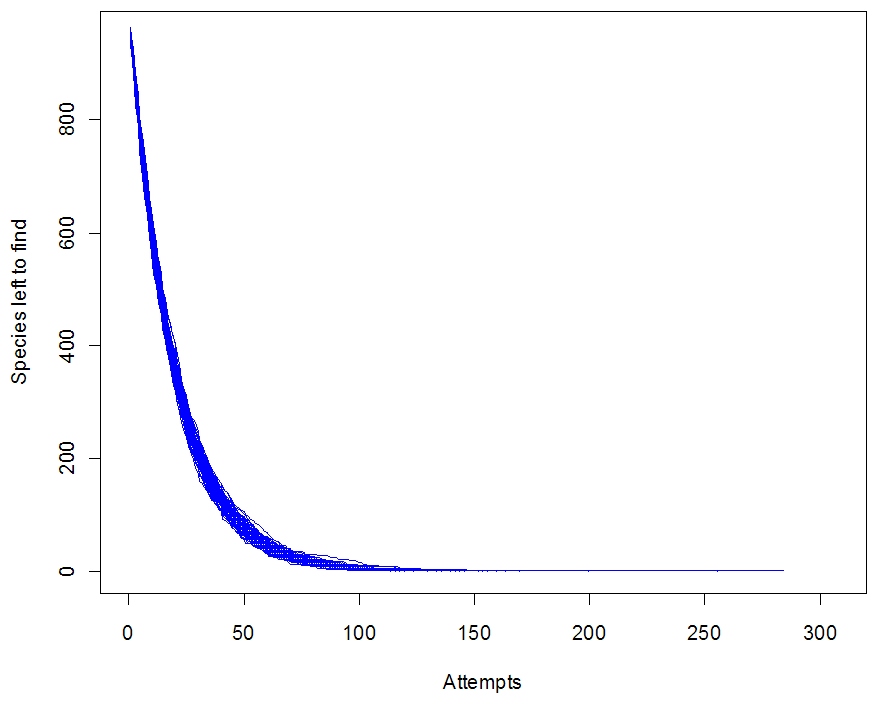
This model is unrealistic for lots of reasons (can you spot all the bad assumptions?), but it does show one of the daunting problems with this task: the closer you get to the end, the harder it becomes to find the last few species. In particular, you can be stuck at 1 for a depressingly long time. Run the simulation with different options and look at the graphs you get. I’m calling this “The unicorn problem,” after Nic Cage’s impossible-to-rob car in the movie Gone in 60 Seconds.
Do you have a real-life unicorn of one sort or another?
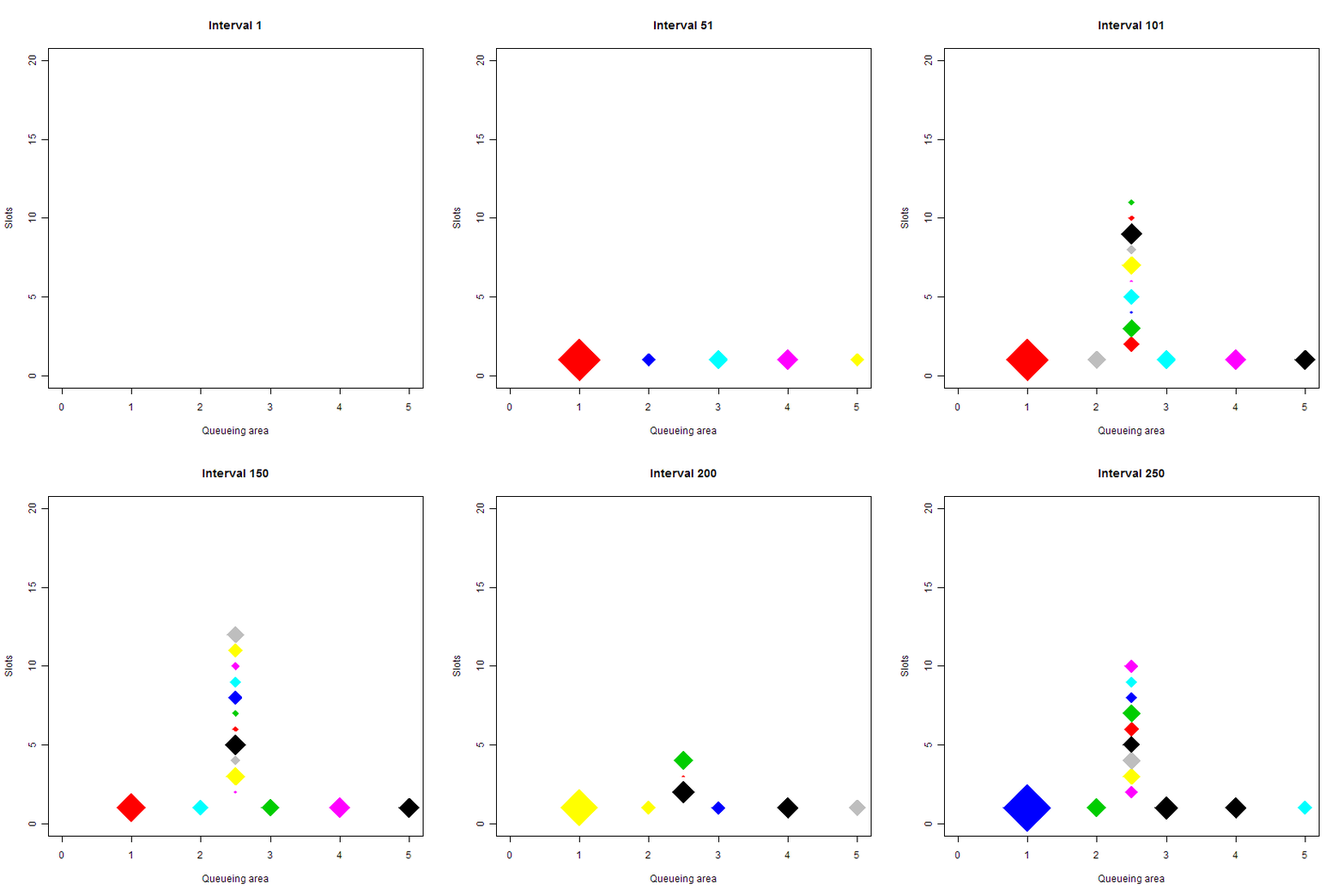
Shown above is a queueing simulation. Each diamond represents a person. The vertical line up is the queue; at the bottom are 5 slots where the people are attended to. The size of each diamond is proportional to the log of the time it will take them to be attended. Color is used to tell one person from another and doesn’t have any other meaning. Code for this simulation, written in R, is here. This is my second post about queueing simulation, you can find the first one, including an earlier version of the code, here. Thanks as always to commenters for their suggestions.
A few notes about the simulation:
Creating an animation to go along with your simulation can take a while to program (unless, perhaps, you are coding in Flash), and it may seem like an extra, unnecessary step. But you can often learn a lot just by “watching”, and animations can help you spot bugs in the code. I noticed that sometimes smaller diamonds hung around for much longer then I expected, which led me to track down a tricky little error in the code.
As usual, I’ve put all of the configuration options at the beginning of the code. Try experimenting with different numbers of intervals and tellers/slots, or change the mean service time.
If you want to run the code, you’ll need to have ImageMagick installed. If you are on a PC, make sure to include the full path to “convert”, since Windows has a built-in convert tool might take precedence. Also, note how the files that represent the individual animation cells are named. That’s so that they are added in the animation in the right order, naming them sequentially without zeros at the beginning failed.
I used Photoshop to interlace the animated GIF and resave. This reduced the file size by over 90%
The code is still a work in progress, it needs cleanup and I still have some questions I want to “ask” of the simulation.
I should state right away that I know almost nothing about queuing theory. That’s one of the reasons I wanted to do some queuing simulations. Another reason: when I’m waiting in line at the bank, I tend to do mental calculations for how long it should take me to get served. I look at the number of tellers attending, pick an average teller session length (say one or two minutes), then come up with an average wait per person in line. For example, if there are 4 tellers and the average person takes 2 minutes to do her transaction, then new tellers should become available every 30 seconds. If I’m the 6th person in line, I should expect to wait 3 minutes before I’m attended.
However, based on my experience (the much maligned anecdotal), it often takes much longer than expected. My suspicion is that over time the teller’s get “clogged up” with the slowest people, so that even though an average person might take only 2 minutes, the people you actually see being attended right now are much more likely to be those who take a long time.
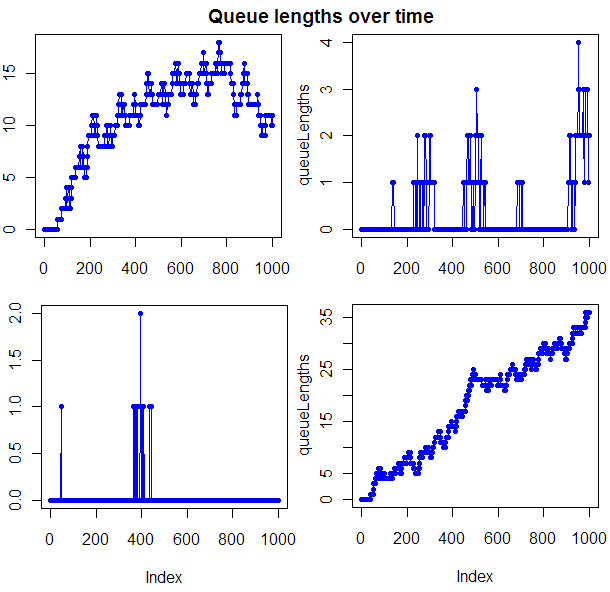
To explore this possibility, I set up a simulation in R (as usual, full source code provided at end of post). The first graph, at the beginning of this post, shows the length of queues over time for 4 runs of the simulator, all with the same configuration parameters. Often this graph was completely flat. Note though that when things get out of hand in terms of queue length, they can get way out of hand. To get a feel for how long you would have to wait, given that there is a line in front of you, I tracked how long the first person in line had to wait to be served. Given my configuration settings, this wait would be expected to last 5 intervals. It does seem to take longer than 5 intervals, though I want to tweak the model some and do more testing before I’m ready to quantify that wait.
There are, as with any models, things that make this one unrealistic. The biggest may be that people get in line with the same probability no matter how long the line is. What I need is some kind of tendency to abandon the line if it’s too long. That shouldn’t shorten the wait times for those already in line. I could make those worse. If you assume that slower people are prepared to wait longer in line, then the line is more likely to have slow people. Grandpa Jones is willing to spend an hour in line so he can chat for a while with the pretty young teller; but if the line is too long, that 50-year-old business guy will come back later to deposit his check. I would imagine that, from the bank’s perspective, this presents a tricky dilemma. The people whose time is worth the least are probably the most likely to be clogging up your tellers, upsetting the customers you care the most about (I know, I know, Bank of America cares about all of us equally, right?).
Code so far, note that run times can be very long for high intervals if the queue length gets long:
#### Code by Matt Asher. Published at StatisticsBlog.com ####
#### CONFIG ####
# Number of slots to fill
numbSlots = 5

# Total time to track
intervals = 1000

# Probability that a new person will show up during an interval
# Note, a maximum of one new person can show up during an interval
p = 0.1

# Average time each person takes at the teller, discretized exponential distribution assumed
# Times will be augmented by one, so that everyone takes at least 1 interval to serve
meanServiceTime = 25

#### INITIALIZATION ####
queueLengths = rep(0, intervals)
slots = rep(0, numbSlots)
waitTimes = c()
leavingTimes = c()
queue = list()
arrivalTimes = c()
frontOfLineWaits = c()


#### Libraries ####
# Use the proto library to treat people like objects in traditional oop
library("proto")

#### Functions ####
# R is missing a nice way to do ++, so we use this
inc <- function(x) {
  eval.parent(substitute(x <- x + 1))
}

# Main object, really a "proto" function
person <- proto(
	intervalArrived = 0,
	intervalAttended = NULL,

	# How much teller time will this person demand?
	intervalsNeeded = floor(rexp(1, 1/meanServiceTime)) + 1,
	intervalsWaited = 0,
	intervalsWaitedAtHeadOfQueue = 0,
)

#### Main loop ####
for(i in 1:intervals) {
	# Check if anyone is leaving the slots
	for(j in 1:numbSlots) {
		if(slots[j] == i) {
			# They are leaving the queue, slot to 0
			slots[j] = 0
			leavingTimes = c(leavingTimes, i)
		}
	}

	# See if a new person is to be added to the queue
	if(runif(1) < p) {
		newPerson = as.proto(person$as.list())
		newPerson$intervalArrived = i
		queue = c(queue, newPerson)
		arrivalTimes  = c(arrivalTimes, i)
	}

	# Can we place someone into a slot?
	for(j in 1:numbSlots) {
		# Is this slot free
		if(!slots[j]) {
			if(length(queue) > 0) {
				placedPerson = queue[[1]]
				slots[j] = i + placedPerson$intervalsNeeded
				waitTimes = c(waitTimes, placedPerson$intervalsWaited)
				# Only interested in these if person waited 1 or more intevals at front of line
				if(placedPerson$intervalsWaitedAtHeadOfQueue) {
					frontOfLineWaits = c(frontOfLineWaits, placedPerson$intervalsWaitedAtHeadOfQueue)
				}

				# Remove placed person from queue
				queue[[1]] = NULL
			}
		}
	}

	# Everyone left in the queue has now waited one more interval to be served
	if(length(queue)) {
		for(j in 1:length(queue)) {
			inc(queue[[j]]$intervalsWaited) # = queue[[j]]$intervalsWaited + 1
		}

		# The (possibley new) person at the front of the queue has had to wait there one more interval.
		inc(queue[[1]]$intervalsWaitedAtHeadOfQueue) # = queue[[1]]$intervalsWaitedAtHeadOfQueue + 1
	}

	# End of the interval, what is the state of things
	queueLengths[i] = length(queue);
}

#### Output ####
plot(queueLengths, type="o", col="blue", pch=20, main="Queue lengths over time", xlab="Interval", ylab="Queue length")
# plot(waitTimes, type="o", col="blue", pch=20, main="Wait times", xlab="Person", ylab="Wait time")
In their book “Complex Adaptive Systems”, authors Miller and Page create a theoretic model for bee attacks, based on the real, flying, honey-making, photogenic stingers. Suppose the hive is threatened by some external creature. Some initial group of guard bees sense the danger and fly off to attack. As they go, they lay down a scent. Other bees join in the attack if their scent sensitivity threshold (SST) is reached. When they join the attack, they send out their own warning scent, perhaps triggering an even bigger attack. The authors make the point that if the colony of bees were homogeneous, and every single one had the same attack threshold, then if that threshold was above the initial attack number, then no one else would join in. If it were below, then everyone goes all at once. Fortunately for the bees, they are a motley lot, which is to say a lot more diverse than you would imagine just from looking at the things. As a result, they exhibit much more complicated behavior. The authors describe a model with 100 bees and call their attack threshold “R”. By assuming a heterogeneous population of 100 with thresholds all equal spaced, they note:
“In the hetrogeneous case, a full-scall attack ensues for [latex]R \geq 1[/latex]. This latter result is easy to see, because once at least one bee attacks, then the bee with threshold equal to one will join the fray, and this will trigger the bee with the next highest threshold to join in, and so on…. It is relatively difficult to get the homogeneous hive to react, while the hetrogeneous one is on a hair trigger. Without explicity incorporating the diversity of thresholds, it is difficult to make any kind of accurate prediction of how a given hive will behave.”
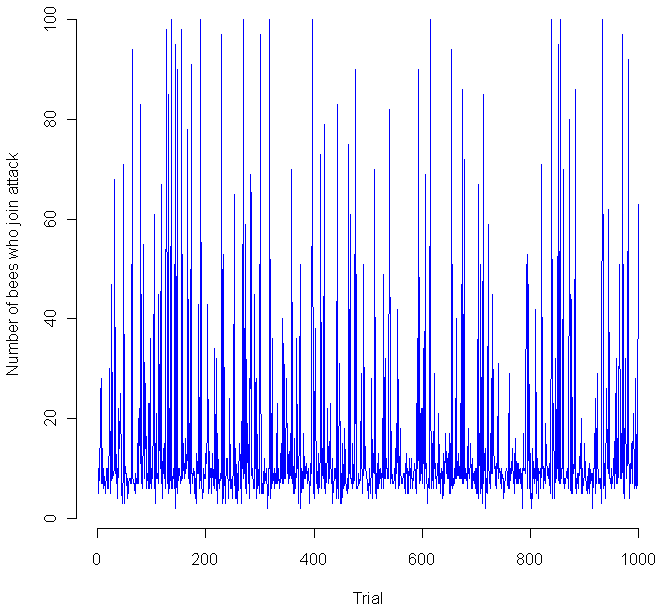
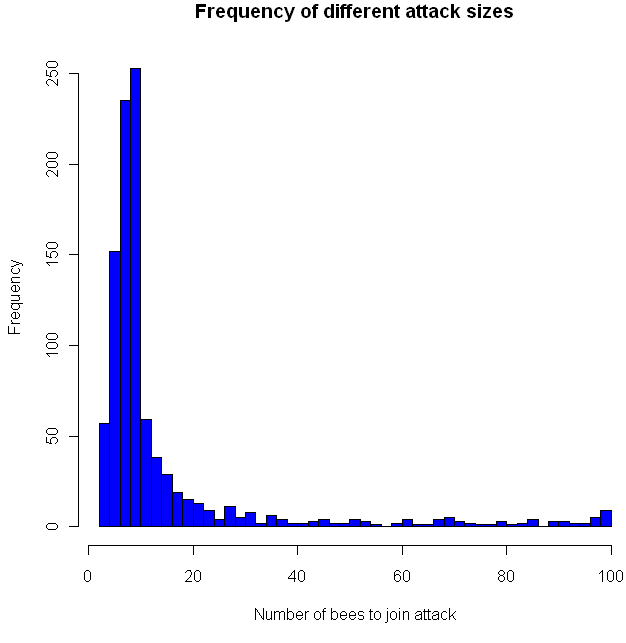
I think this last sentence is their way of noting that the exact distribution of sensitivities makes a huge difference in how the bees behave, which indeed it does. I decided to put the bees to the test, so I coded a simulation in the language R (code at the end of this post). I gave 100 virtual apis mellifera a random sensitivity level, chosen from a Uniform(1,100) distribution, then assumed 10 guards decided to attack. How would the others respond? Would a hair-trigger chain reaction occur? The chart at the top shows the results from 1000 trials. Looks pretty chaotic, so here’s a histogram of the results:
As you can see, most of the time the chain reaction dies out quickly, with no more than 20 new bees joining in the attack. However, occasionally the bees do go nuts, sending the full on attack. This happened about 1 percent of the time. Perhaps most interestingly, all of the other attack levels were clearly possible as well, in the flat zone from about 30 to 95. You might want to try playing with the distribution of the sensitivities and see if you get any other interesting distributions. Meanwhile, if you decide to raid a hive, make sure to dip yourself in mud first, that way the bees will think you are nothing but an innocent black rain cloud.
Code in R:
trials = 1000

go = rep(0,trials)
initial = 10

for(i in 1:trials) {
  bees = sort(runif(100,1,100))

  # Everyone who's threshold is less than the inital amount goes.
  going = length(bees[bees initial) {
    more = length(bees[bees going) {
    # Keep doing this until it stops
      going = more
      more = length(bees[bees